

Interface Traffic Indicator 1.5
SNMP graph utility to measure incoming and outgoing traffic on an interface
Program info
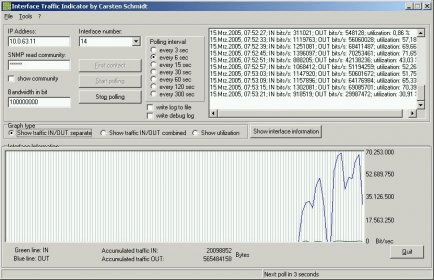
Interface Traffic Indicator, inftraf.exe
Software by Carsten Schmidt
If you like this software, please consider donating. Follow the Paypal
link or Amazon wishlist at:
http://software.ccschmidt.de/appreciation.html
Please report bugs and feature requests to:
[email protected]
What does it do and how does it work?
Inftraf is a tool that requests IN/OUT octet data (MIB2) from SNMP-capable
network interfaces. You can use this program in a professional network
environment to monitor selected network interfaces (even backplane ports
if the device provides the information) or you can monitor your home network
or cable/modem/ISDN connection to the internet. You can monitor bits/sec,
utilization and accumulated traffic.
Enter IP address and SNMP read community into the fields and click on FIRST
CONTACT. The program will then try to retrieve all interface information of
the device. If successful, this will enable the START POLLING button. Select
a polling interval and an interface and start polling.
Values in graph are calculated and shown as either bits or bytes per second
or utilization in percent. Just select the appropriate graph.
Error messages are shown in the statusbar at the bottom.
Other functions provided:
- Show device information
- Reset all values and graphs
- Options dialog
- Two log variations: normal log also shown in GUI and a debug log that shows
all polling information that was retrieved. Both can be written to files.
Details
Extensions

No information available
The data will be available later.Awards

There are no awards
Over time, app awards will appear here.


Comments